

How Freelance Developers Can Automate Client Onboarding

🚀 Why Automate Client Onboarding?
As a freelance developer, first impressions matter. A smooth onboarding experience makes your business look professional, sets clear expectations, and reduces repetitive work.
Benefits of automation:
✅ Save time with repeatable workflows
My Hosting ChoiceNeed Fast Hosting? I Use Hostinger Business
This site runs on the Business Hosting Plan. It handles high traffic, includes NVMe storage, and makes my pages load instantly.
Get Up to 75% Off Hostinger →⚡ 30-Day Money-Back Guarantee
✅ Collect consistent client data
✅ Avoid back-and-forth emails
✅ Reduce onboarding errors
✅ Improve client satisfaction
⚙️ What Parts of Onboarding Can You Automate?
| Onboarding Step | Can Be Automated? | Tools to Use |
|---|---|---|
| Welcome Email | ✅ Yes | Gmail Templates, MailerLite |
| Proposal & Contract | ✅ Yes | Bonsai, HelloSign, PandaDoc |
| Intake Form & Requirements | ✅ Yes | Typeform, Tally, Google Forms |
| Project Brief Confirmation | ✅ Yes | Notion, Trello, ClickUp |
| Invoicing & Payments | ✅ Yes | Stripe, PayPal, Wave |
🔧 Recommended Automation Tools for Freelance Devs
🟡 1. Zapier / Make (Integromat)
Automate tasks between tools:
Auto-send welcome emails after form submission
Save client info in Notion or Google Sheets
Trigger contracts based on form answers
🔵 2. Bonsai (All-in-one freelance suite)
Send proposals
Automate contracts
Create invoice workflows
Schedule and track tasks
🟢 3. Calendly (Or alternatives like TidyCal)
Let clients self-schedule meetings. Avoid back-and-forth messaging.
🔴 4. Typeform or Tally.so
Create beautiful onboarding forms to gather project info, timelines, budgets, and requirements.
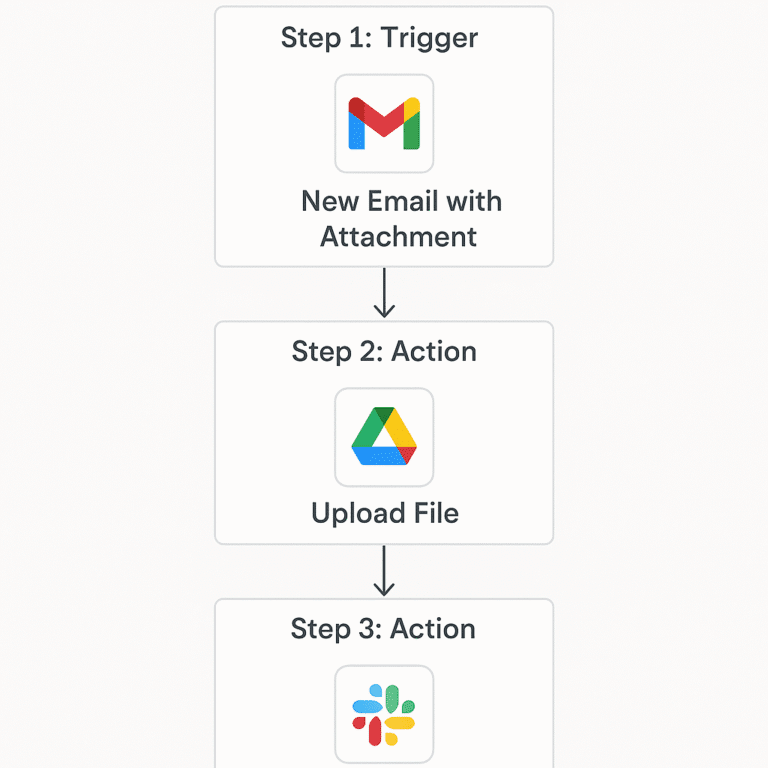
🛠️ Example: Automating Onboarding with Zapier
Zap:
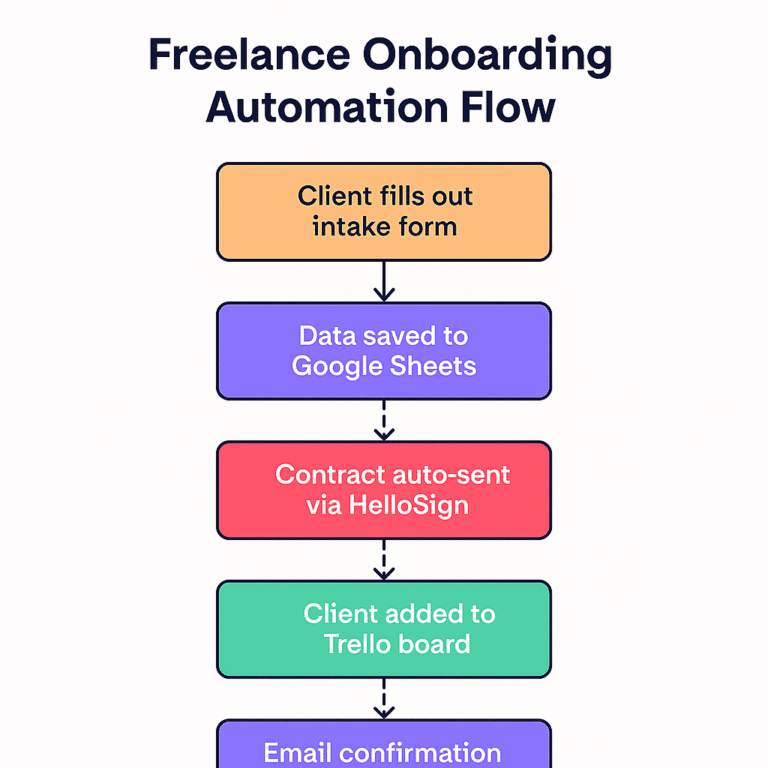
Client fills Typeform ➜
Data saved to Google Sheets ➜
Useful Links
- Why Developer Communities Are the New Universities in 2025
- Top Low-Code & No-Code Development Platforms for Dev Teams in 2025
- Human Programmer Wins Against OpenAI in Tokyo—What This Means for AI Developers
- 🧠 The 7 AI Coding Mistakes That Are Costing You Time, Money & Rankings (2025 Edition)
- 🌐 The Ultimate Guide to Programmatic SEO for Developers (2025)
- Why Prompt Libraries Are the New Frameworks in AI Coding (2025)
Contract auto-sent via HelloSign ➜
Client added to Trello board ➜
Email confirmation sent to both
📋 Step-by-Step Onboarding Template
Send Welcome Email (Auto)
Client Fills Intake Form (Auto Trigger)
Auto-Generate Proposal / Contract
Client Signs, You Both Get Notified
Project Starts + Kickoff Call Scheduled
❓ FAQ: Freelance Client Onboarding Automation
Q1: Is it expensive to automate onboarding?
A: Most tools offer free tiers or low-cost plans. Start with free tools like Google Forms, Calendly, and Notion.
Q2: Will automation make onboarding impersonal?
A: Not at all — use personalized messages, dynamic fields, and thoughtful copy to maintain a human touch.
Q3: Which tool is best for solo freelance devs?
A: Try Bonsai for all-in-one or combine Zapier + Notion + Google Suite for flexibility.
Q4: How do I handle custom onboarding for big clients?
A: Create tiered onboarding workflows — one for small clients (fully automated) and one for large projects (semi-manual with automation support).
🔗 Useful Links
🏁 Final Thoughts
Client onboarding doesn’t have to be chaotic. By automating just a few core steps, freelance developers can elevate their professionalism, save hours every week, and start each project on the right foot.
Take it one step at a time. Start with a form + welcome email, and build from there!

🚀 Let's Build Something Amazing Together
Hi, I'm Abdul Rehman Khan, founder of Dev Tech Insights & Dark Tech Insights. I specialize in turning ideas into fast, scalable, and modern web solutions. From startups to enterprises, I've helped teams launch products that grow.
- ⚡ Frontend Development (HTML, CSS, JavaScript)
- 📱 MVP Development (from idea to launch)
- 📱 Mobile & Web Apps (React, Next.js, Node.js)
- 📊 Streamlit Dashboards & AI Tools
- 🔍 SEO & Web Performance Optimization
- 🛠️ Custom WordPress & Plugin Development