
Web Performance Lies We Still Believe (And What to Do Instead in 2025)
Your site loads in 2 seconds. Great. But does it feel fast?
Even in 2025, web performance is plagued with outdated beliefs and half-truths that continue to hurt developers, SEO experts, and site owners alike.
My Hosting Choice
Need Fast Hosting? I Use Hostinger Business
This site runs on the Business Hosting Plan. It handles high traffic, includes NVMe storage, and makes my pages load instantly.
Get Up to 75% Off Hostinger →⚡ 30-Day Money-Back Guarantee
We obsess over speed scores, chase Lighthouse 100s, and blindly trust “lazy loading” plugins—yet our websites still underperform. Why?
Because we’re still believing in lies that no longer reflect how modern web performance really works.
In this post, we’re breaking down the top web performance myths, why they’re misleading, and what to do about them if you want a faster, more user-friendly, and higher-ranking website.
🚫 Lie #1: “If My Lighthouse Score Is 100, My Site Is Fast”
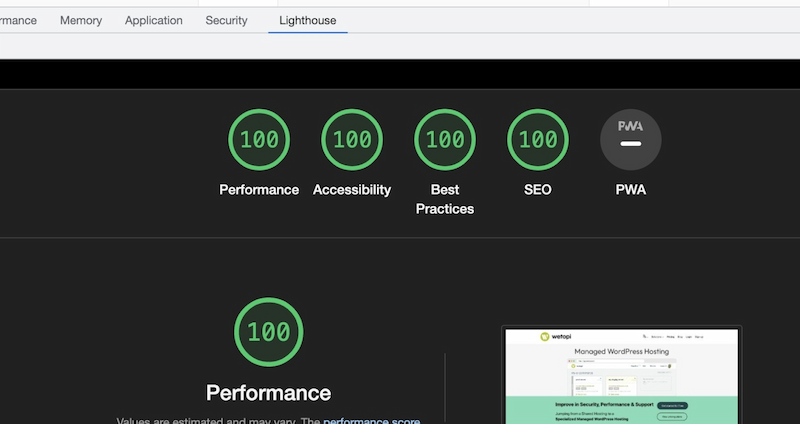
This is the most common trap developers fall into.
Lighthouse scores are a useful benchmark, but not a true performance report. Why? Because:
- They run on simulated conditions, not real-world data.
- They test one page, in one location, at one time.
- They don’t represent field data from your actual users.
✅ The Truth:
Your Lighthouse score is just a starting point. For a true performance picture, check:
- PageSpeed Insights (field data section)
- Chrome User Experience Report (CrUX)
- Google Search Console → Core Web Vitals
Real users > simulated bots.
🚫 Lie #2: “My Website Loads Fast on My Computer, So It’s Fine”
Just because it’s fast for you, doesn’t mean it’s fast for others.
You probably have:
- A cached version of the site
- Fast internet
- A high-end machine
- Fewer third-party scripts firing on your end
Meanwhile, your visitors might be on:
- 3G mobile in a rural area
- A slow, low-RAM Android device
- Shared public Wi-Fi
✅ The Truth:
Always test using tools that simulate poor networks and mid-tier devices, such as:
- Lighthouse mobile mode (throttled)
- WebPageTest.org
- Chrome DevTools → Network throttling
🚫 Lie #3: “Lazy Loading Fixes All My Performance Issues”
Lazy loading is a useful technique — but it’s not a cure-all.
In fact, it can:
- Delay your Largest Contentful Paint (LCP) if implemented incorrectly
- Break image SEO if alt tags or
noscriptfallbacks are missing - Create layout shifts if you don’t define
widthandheight
✅ The Truth:
Use loading="lazy" only for below-the-fold content. For above-the-fold:
- Load images normally
- Use
fetchpriority="high"for critical LCP images - Define image dimensions in CSS/HTML
🚫 Lie #4: “CDNs Always Make Your Site Faster”

Content Delivery Networks (CDNs) can help — but only if your bottlenecks are related to static asset delivery.
If your HTML is being dynamically generated slowly, or your site has:
- Excessive third-party scripts
- Heavy JavaScript rendering on the client
- Poor TTFB (Time to First Byte)
…a CDN won’t help much.
Useful Links
- Headless CMS in 2025: Is It Worth the Complexity?
- Why SPAs Still Struggle with SEO in 2026 (And What Developers Can Actually Do About It)
- How to Write Content That Both Search Engines and AI Assistants Understand in 2025
- Reality of Serverless: Pros, Costs, Security, and Trade-offs
- Why Developers Are Earning Less in 2025: The Hidden Impact of AI on Rates
- Human Programmer Wins Against OpenAI in Tokyo—What This Means for AI Developers
✅ The Truth:
Use a CDN, but combine it with:
- Server-side caching (e.g., Redis, Varnish)
- Pre-rendering strategies
- Static site generation (Next.js, Astro, Hugo)
🚫 Lie #5: “JavaScript Frameworks Are Always Fast”
Nope. In fact, many JS-heavy frameworks (React, Angular, Vue) can harm:
- Initial load time
- Interactivity (TTI, TBT)
- Core Web Vitals
Why? Because:
- They ship large bundles
- Rely on client-side hydration
- Often ignore SSR or partial rendering
✅ The Truth:
Use modern lightweight frameworks (like SvelteKit, Qwik, Astro) and:
- SSR wherever possible
- Code-split aggressively
- Hydrate only what’s necessary
🚫 Lie #6: “Optimizing Images Is Optional in 2025”
Absolutely false.
In 2025, images are still the #1 contributor to page bloat.
Uncompressed images lead to:
- High Largest Contentful Paint (LCP)
- Poor bandwidth use on mobile
- Laggy scroll & rendering
✅ The Truth:
- Use
WebPorAVIFformats - Resize images to display size
- Add
srcsetfor responsive delivery - Use next-gen compression tools like Squoosh
🚫 Lie #7: “Core Web Vitals Are Just SEO Metrics”
While CWV does affect rankings — it’s more than SEO.
Poor CWV directly impacts:
- Bounce rate
- User satisfaction
- Conversions (especially on eCommerce)
Sites with poor LCP or CLS see higher drop-offs and lower engagement.
✅ The Truth:
Core Web Vitals are UX metrics first, SEO metrics second.
Even if they didn’t affect your Google rank, they still affect your bottom line.
✅ Action Checklist: What To Do Instead
- 🧪 Audit with real user data, not just Lighthouse
- 🎯 Prioritize LCP, FID (now INP), and CLS
- 🔌 Remove or defer unused third-party scripts
- 🪄 Reduce JS payloads + enable tree shaking
- 📦 Serve assets via CDN + HTTP/3
- 🌍 Test across devices, not just your own browser
- 🏁 Use fast hosting, server caching, and a static-first mindset
📚 Useful Tools to Improve Web Performance
Here are some free tools to benchmark and improve your site performance:
- PageSpeed Insights
- WebPageTest
- Chrome UX Report
- Core Web Vitals Report in GSC
- Squoosh – Compress images like a pro
- DevTechInsights Web Performance Checker Tool ✅
❓ FAQ Section
Q1: Do Core Web Vitals actually impact Google ranking?
Yes, especially on mobile. While not a top 3 factor, CWV is part of the Page Experience Signal.
Q2: What’s the biggest factor affecting LCP?
Usually it’s the main image or hero content loading late. Use
fetchpriority="high" and compress the image.Q3: How often should I test my web performance?
At least monthly — or after every theme/plugin/code update.
Q4: Are lazy-loading plugins bad?
Not always, but many are overused or misconfigured. Use with care, especially on above-the-fold content.
Q5: What’s the fastest way to improve my CWV?
Compress images, eliminate render-blocking JS, reduce font loads, and self-host critical assets.
🔗 Final Thoughts + Bonus Tool
Web performance is no longer just about how fast your site loads — it’s about how usable it feels.
If you’re still optimizing based on outdated beliefs, you’re leaving rankings, traffic, and money on the table.
👉 Use our free Web Performanhttps://admin.devtechinsights.com/tools/seo-keyword-generatorce Checker Tool to analyze your LCP, TTFB, and Core Web Vitals in one click — no sign-up required.
Let’s stop believing the lies.
Let’s build faster, smarter, user-first websites — together.
🚀 Let's Build Something Amazing Together
Hi, I'm Abdul Rehman Khan, founder of Dev Tech Insights & Dark Tech Insights. I specialize in turning ideas into fast, scalable, and modern web solutions. From startups to enterprises, I've helped teams launch products that grow.
- ⚡ Frontend Development (HTML, CSS, JavaScript)
- 📱 MVP Development (from idea to launch)
- 📱 Mobile & Web Apps (React, Next.js, Node.js)
- 📊 Streamlit Dashboards & AI Tools
- 🔍 SEO & Web Performance Optimization
- 🛠️ Custom WordPress & Plugin Development