
What Is DevContainer and Why Every Developer Will Use It Soon
🚀 Introduction
Setting up a local dev environment used to be a nightmare—conflicting versions, broken builds, and “it works on my machine” chaos. Enter DevContainers — a game-changing solution that eliminates these issues.
In 2025, DevContainers are rapidly becoming standard practice among developers, whether you’re working solo or in a team. But what exactly is a DevContainer? Why is it gaining so much traction?
My Hosting Choice
Need Fast Hosting? I Use Hostinger Business
This site runs on the Business Hosting Plan. It handles high traffic, includes NVMe storage, and makes my pages load instantly.
Get Up to 75% Off Hostinger →⚡ 30-Day Money-Back Guarantee
Let’s break it down.
🧱 What Is a DevContainer?
A DevContainer (short for Development Container) is a portable, isolated development environment defined by a .devcontainer.json file and backed by Docker. It tells your IDE (like VS Code or GitHub Codespaces) how to set up your project workspace — including OS, tools, extensions, and dependencies — inside a container.
Think of it as a pre-configured box where your code runs identically on any machine. No more “missing package” errors or OS mismatches.
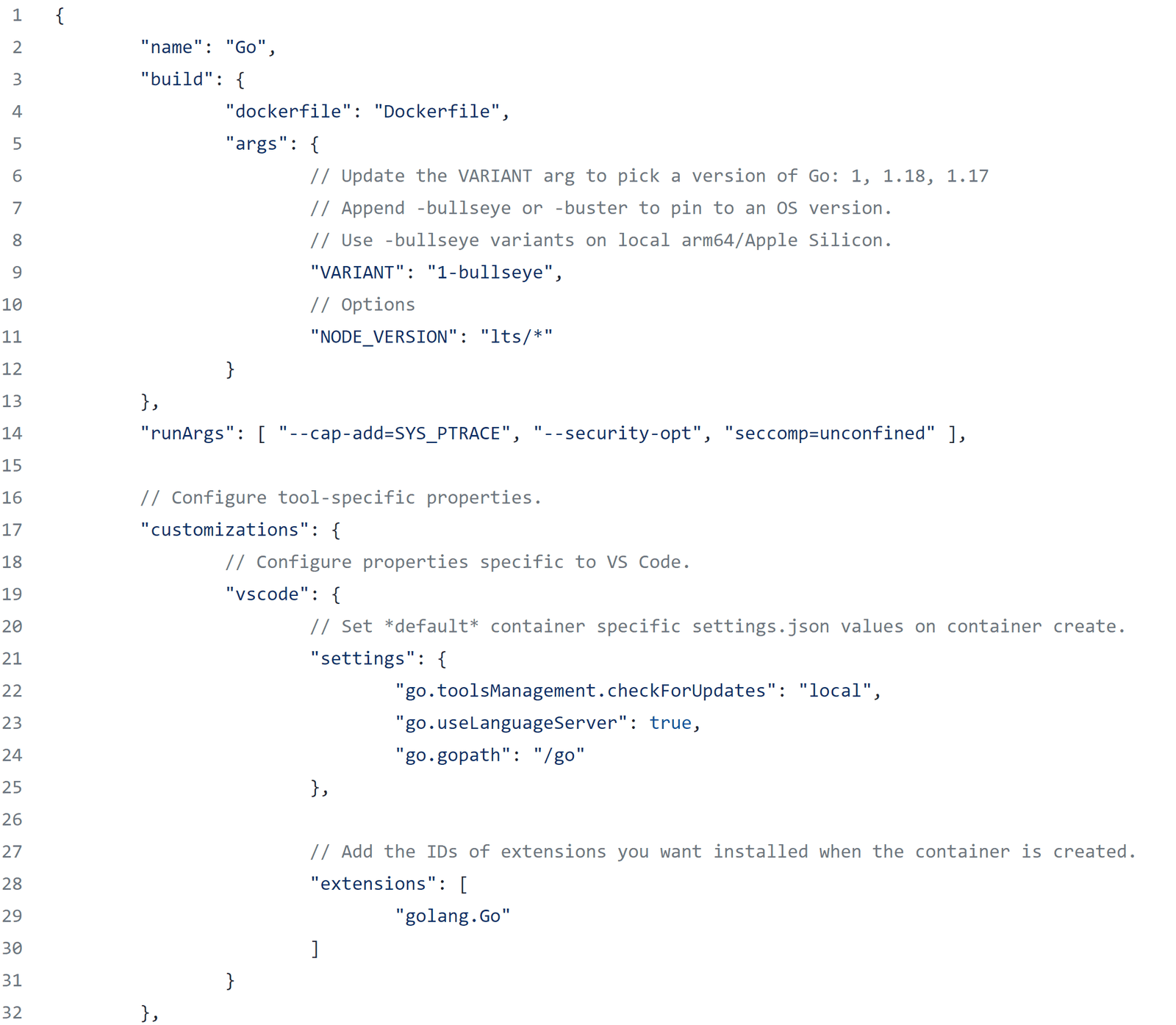
If you want more information with visuals, then see the pdf below
🛠️ What’s Inside a DevContainer?
A typical DevContainer setup includes:
- A Dockerfile (custom base image or install instructions)
.devcontainer.json(config file with settings and extensions)- Pre-installed language runtimes, linters, tools (e.g., Node.js, Python, Rust)
- VS Code extensions you want active inside the container
- Custom commands to run post-setup
This stack gets auto-loaded by IDEs like Visual Studio Code or GitHub Codespaces, launching a fully working dev environment in seconds.
⚡ Why DevContainers Are Taking Over in 2025
✅ 1. Consistency Across Teams
Whether you’re onboarding a new team member or collaborating with freelancers, everyone works in the exact same environment. Zero setup errors. No surprises.
✅ 2. Perfect for Open Source Projects
Want contributors to avoid long setup instructions? Just ship a .devcontainer folder. They’ll launch the repo in GitHub Codespaces or locally and get working instantly.
✅ 3. Local-First, Cloud-Ready
Start locally with Docker + VS Code, then scale to GitHub Codespaces or other cloud environments with no extra config.
Useful Links
- Why Developer Communities Are the New Universities in 2025
- Top Low-Code & No-Code Development Platforms for Dev Teams in 2025
- 10 High-Paying Developer Skills to Learn in 2025 for Career Growth
- The Hidden Risks of Public GitHub Repositories
- Progressive Hydration Explained: The Future of Web Performance
- Best API Management Tools in 2025: A Developer’s Perspective
✅ 4. Instant Recovery
Corrupted local machine? Just pull your repo and spin up the DevContainer again — everything is preserved and version-controlled.
✅ 5. Secure & Isolated
You can try risky tools, bleeding-edge versions, or test dependency upgrades without polluting your local setup.
🔧 How to Set Up a DevContainer (Simple Guide)
Step 1: Add .devcontainer/ folder to your project root
**Step 2: Include a Dockerfile or choose a base image from Dev Container Features
Step 3: Create devcontainer.json file, like this:
jsonCopyEdit{
  "name": "Node Dev",
  "build": {
    "dockerfile": "Dockerfile"
  },
  "settings": {
    "terminal.integrated.shell.linux": "/bin/bash"
  },
  "extensions": ["dbaeumer.vscode-eslint"],
  "postCreateCommand": "npm install"
}
Step 4: Open in VS Code → Command Palette → “Reopen in Container”
Boom. You’re running your entire dev setup inside an isolated Docker container.
👨💻 Top Use Cases for DevContainers
| Use Case | Why DevContainers Help |
|---|---|
| Onboarding Developers | No more lengthy setup — one-click environments |
| Open Source Contributions | No more “how do I run this?” |
| Testing Against Multiple Versions | Use containers to switch between Node 16, 18, etc. |
| Teaching & Workshops | Students get identical working environments |
| Experimenting with New Stacks | Break things safely in containers |
🔄 DevContainer vs. Docker Compose vs. Codespaces
| Feature | DevContainer | Docker Compose | GitHub Codespaces |
|---|---|---|---|
| Primary Use | Dev Environments | Multi-container apps | Cloud-based IDE |
| Tied to Editor? | Mostly VS Code | No | Yes (VS Code online) |
| Easy Setup? | ✅ Simple config | ❌ More complex | ✅ Fully managed |
| Cloud-Ready? | ✅ Yes | ❌ Not directly | ✅ Yes |
🔍 Real-World Examples
- Microsoft uses DevContainers to streamline internal team workflows.
- Open Source Projects like
nestjs,supabase, andvitenow include.devcontainerfolders. - Freelancers are using them to deliver clean dev environments to clients.
📈 Why You Should Start Using DevContainers Today
| Benefit | Impact |
|---|---|
| Saves time on environment setup | Hours/days of setup compressed into seconds |
| Boosts team productivity | Zero “it works on my machine” issues |
| Enables hybrid/local/cloud dev | Switch between Docker & Codespaces seamlessly |
| Encourages clean architecture | Containerize your dev setup like you do prod apps |
🧠 Final Thoughts
In 2025, the lines between local and cloud development are fading. DevContainers are at the heart of this shift — giving developers consistency, speed, and flexibility.
Whether you’re a solo dev, part of a team, or managing open-source repos, DevContainers will soon be an essential part of your workflow.
Start using them now — before you’re left behind.
🔗 Useful Links
- Official Dev Container Spec (containers.dev)
- VS Code DevContainers Extension
- GitHub Codespaces
- Docker Desktop
Q1. Do I need Docker to use DevContainers?
Yes, DevContainers run on top of Docker (or a compatible runtime like Podman).
Q2. Can I use DevContainers without VS Code?
Technically yes, but the native support and smooth experience is currently best in VS Code or Codespaces.
Q3. Are DevContainers only for JavaScript projects?
Not at all! They work for Python, Go, Rust, PHP, C++, Java — any stack you can containerize.
Q4. Can I push DevContainers to production?
While they share Docker infrastructure, DevContainers are meant for dev environments — but you can certainly adapt the Dockerfile for deployment too.
🔗 Try Our Free DevTools
Looking to supercharge your development workflow? Try our Free Keyword Generator— 100% free and unlimited.
🚀 Let's Build Something Amazing Together
Hi, I'm Abdul Rehman Khan, founder of Dev Tech Insights & Dark Tech Insights. I specialize in turning ideas into fast, scalable, and modern web solutions. From startups to enterprises, I've helped teams launch products that grow.
- ⚡ Frontend Development (HTML, CSS, JavaScript)
- 📱 MVP Development (from idea to launch)
- 📱 Mobile & Web Apps (React, Next.js, Node.js)
- 📊 Streamlit Dashboards & AI Tools
- 🔍 SEO & Web Performance Optimization
- 🛠️ Custom WordPress & Plugin Development